
Request Author Verification
Create an author identity, request verification and understand pending, declined and verified listing states.
Author verification affects how books under that name appear in Trankets listings. It is separate from seller verification and from publishing an individual book.
Prepare the author identity
- Open Authors in your dashboard.
- Select New author. On a small screen, the action can appear as New.
- Enter Author name, using the name printed on the book or the authorised pen name.
- Review the public link, biography and optional photo, then save.
The public author link is chosen at creation and cannot be edited afterward. A similar display name does not mean you own another author's identity. Check the identity before attaching books to it.

Example account. Request review from the author card.
Request review
Find the author card and select Request verification. Check that it changes to Verification pending. Submitting a request does not grant approval or establish a guaranteed review date.
The current request action does not ask you to complete a separate evidence-upload form. Do not send private identity documents through an unrelated product or invoice upload. If the review team needs more information, follow the actual support request.
Read the result
| State | What to do |
|---|---|
| Not verified | Check the author details, then request review when ready. |
| Verification pending | Wait for the review result; the request is not approval. |
| Verification declined | Read the displayed reason. Correct relevant details and use Request again when appropriate. |
| Verified | Check the books' own active, listed and eligibility settings. |
| Removed | Read the restriction and contact support if you believe it is incorrect. Do not try to bypass it with duplicate identities. |
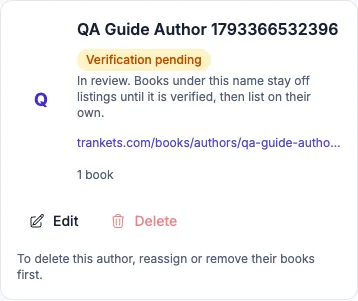
Example account after requesting review. Pending means the request is awaiting a decision.
Check the book's visibility
Before verification, an otherwise accessible book can work through its direct link while staying off Books, discovery and your shop. Verification makes the author eligible for those listings; it does not promise a ranking, a sale or unrestricted publication of every book.
Open the public author link from the card and inspect the current page. If an expected book is missing, check both the author state and that book's settings before changing anything.